
Key Highlights
- Technical SEO mistakes can prevent important product and category pages from being crawled, indexed, or understood correctly.
- Duplicate content, weak category pages, and missing long-tail landing pages can limit your ability to capture commercial search demand.
- Product schema, images, XML sitemaps, and Merchant Center data need to be accurate and consistent to support ecommerce visibility.
- The biggest SEO gains usually come from fixing issues on your highest-value product and category pages first, rather than trying to optimize the entire store at once.
Many ecommerce stores have hundreds of product and category pages but still get little traffic or sales. In fact, an Ahrefs study of 14 billion pages found that 96.55% receive no traffic from Google. Problems like poor site structure, duplicate content, indexing errors, and weak product pages often block growth.
At Growffic, we fixed a client’s 90% traffic drop caused by a JavaScript error, helping them recover lost visibility and sales.
Here are 17 ecommerce SEO mistakes that could be limiting your growth, along with practical ways to fix them.
17 Ecommerce SEO Mistakes and How to Fix Them
The mistakes below cover site structure, content, technical SEO, and emerging AI search issues that quietly drain organic traffic and revenue from ecommerce stores of every size.
1. Poorly Structured Site Architecture
As your store expands, a clear site structure becomes essential. Products can easily get buried under multiple layers of categories, inconsistent URLs, or missing breadcrumbs.
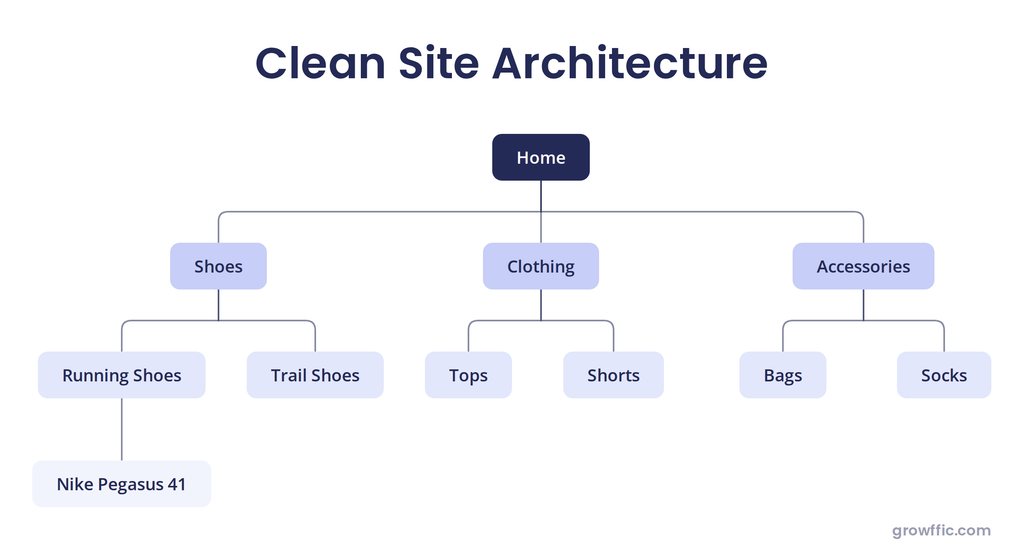
For example, a running shoe may be placed under Home > Shoes > Running Shoes
A logical hierarchy helps shoppers find products quickly and makes it easier for search engines to understand how categories, subcategories, and products relate to each other.
By strengthening site structure and SEO, we helped a luxury D2C travel brand achieve a 70 percent increase in organic traffic in just six months.
How to fix it: Build a structure around how customers actually shop. Clear categories and subcategories, consistent URL patterns, visible breadcrumbs, and internal links connecting related categories and products.
2. Thin or Empty Ecommerce Category Pages
For ecommerce SEO, category pages often target broader commercial keywords than individual product pages.
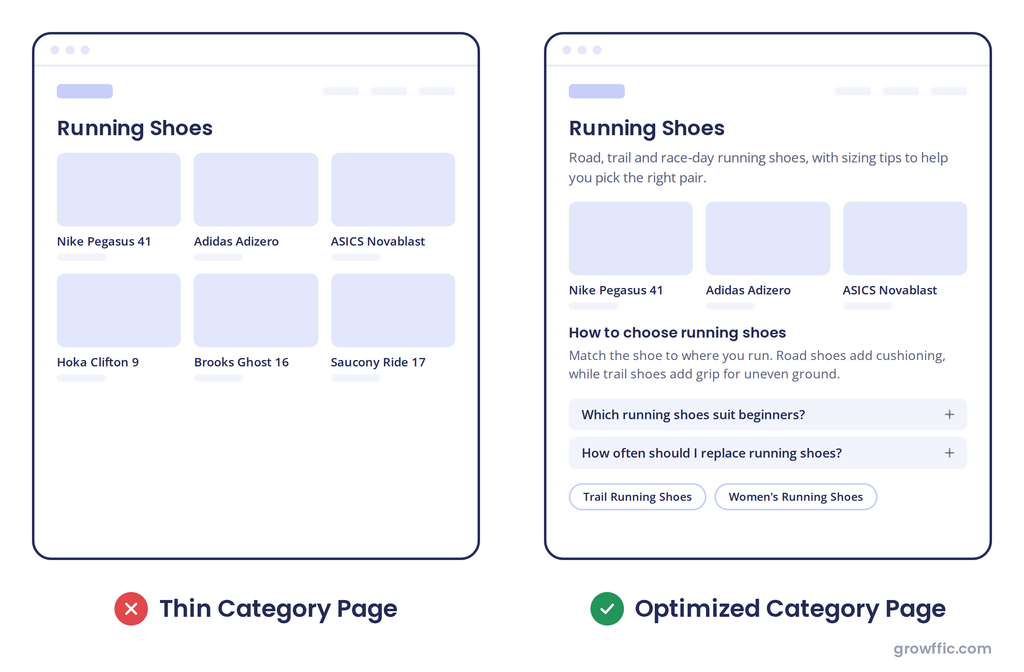
A category page with only a title and product grid may provide insufficient unique context to differentiate itself from competing pages or satisfy the intent behind a competitive commercial query.
Visitors landing on an empty section get no help deciding between products, which hurts both rankings and conversions.
How to fix it: Add useful introductory and supporting content along with buyer‑focused information, relevant FAQs, and links to related categories. Always prioritize genuine usefulness instead of adding text only for SEO.
When the ecommerce category pages don’t have any other content at all, other than links to the products, then it’s really hard for us to rank those pages.” — John Mueller, Search Advocate, Google
Source: mariehaynes.com
3. Targeting Keywords Without Considering Search Intent
Keyword research is more effective when you consider search volume alongside search intent. A well-optimized page can still struggle to rank if it doesn’t match what users expect to find. For example, a comparison query is better suited to a guide or comparison page than a product listing.
Understanding search intent helps ensure your optimization efforts are focused on pages with the right purpose and format.
How to fix it: Review the current search results before targeting a keyword. Identify the content type Google favors. Then match your keyword to the right page type, whether it is a product, category, or informational page.
For Example:
Here is how to match search intent for every page.
| Keywords | Search Intent |
| running shoes | Category page |
| Nike Pegasus 41 | Product page |
| best running shoes for beginners | Buying guide |
| Nike vs Adidas running shoes | Comparison page |
| how to choose running shoes | Informational guide |
Before creating a page, search the keyword and check what type of pages Google already ranks.
4. Letting Filter and Variant URLs Get Indexed
Filters for colour, size, brand, and price can generate thousands of URL combinations. When every combination creates a separate URL, an ecommerce site can quickly accumulate large numbers of near-duplicate pages.
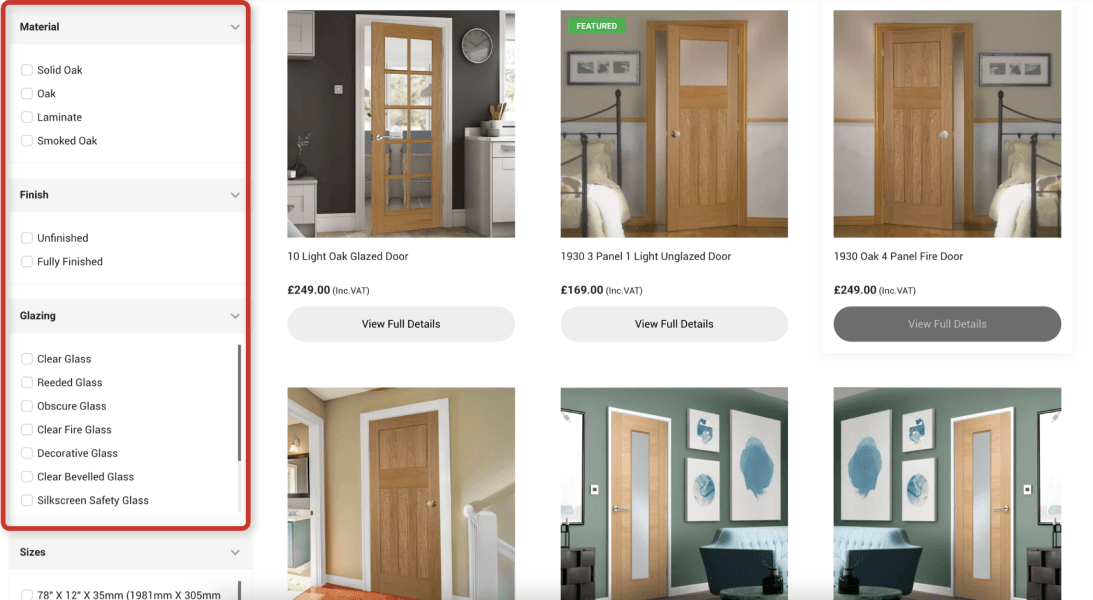
This is known as faceted navigation, where filters and variants create multiple URL versions of the same core category. The problem is not having filters themselves. It is allowing every possible combination to become a searchable page when most combinations offer little unique value.
Example:
Here’s how one category page can turn into thousands of URLs:
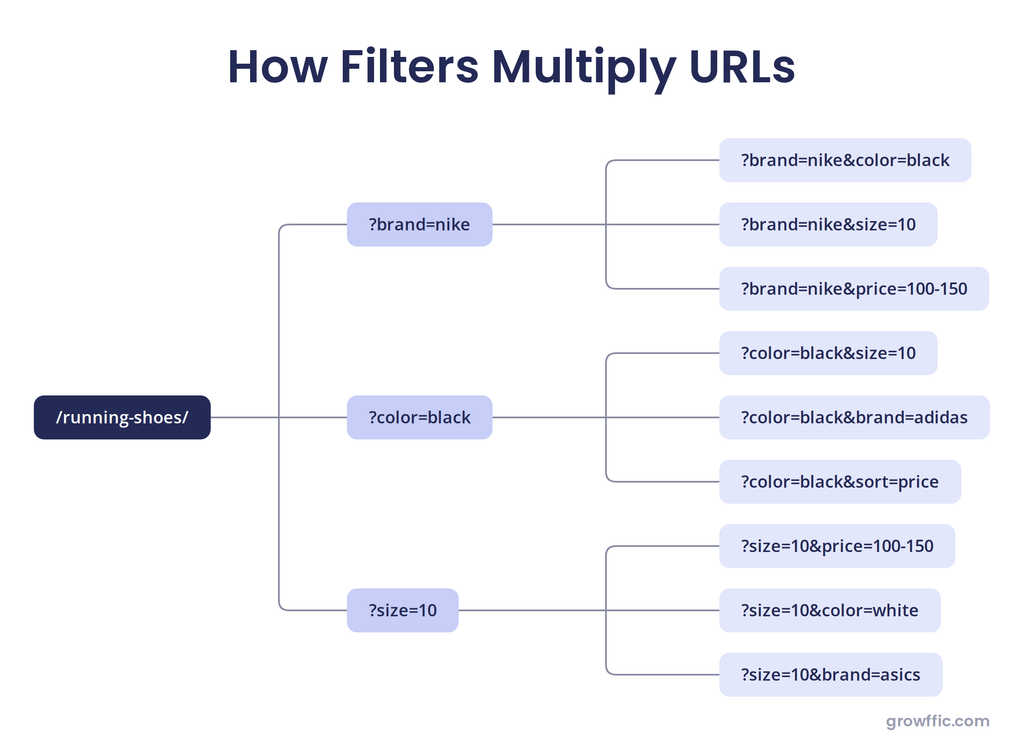
Now imagine adding:
20 brands × 10 sizes × 15 colors × 10 price ranges
It can contribute to index bloat when unnecessary URLs are crawlable/indexable.
How to fix it: Identify filter combinations that have genuine search demand and a distinct product offering. These can become dedicated landing pages. For low-value combinations, prevent unnecessary URL creation where possible and avoid treating every filter combination as a searchable page.
Scale Your Digital Store
Ecommerce SEO done right means more category and product pages ranking for buyer-intent keywords, not just traffic. We build SEO strategies that scale catalogues and grow online sales sustainably.
5. Infinite Scroll With No Paginated URLs
A category page may load an initial batch of products and then load more products as shoppers scroll, without changing the URL. If important products are only accessible through scroll interactions, search engines may not discover every product as reliably as shoppers do.
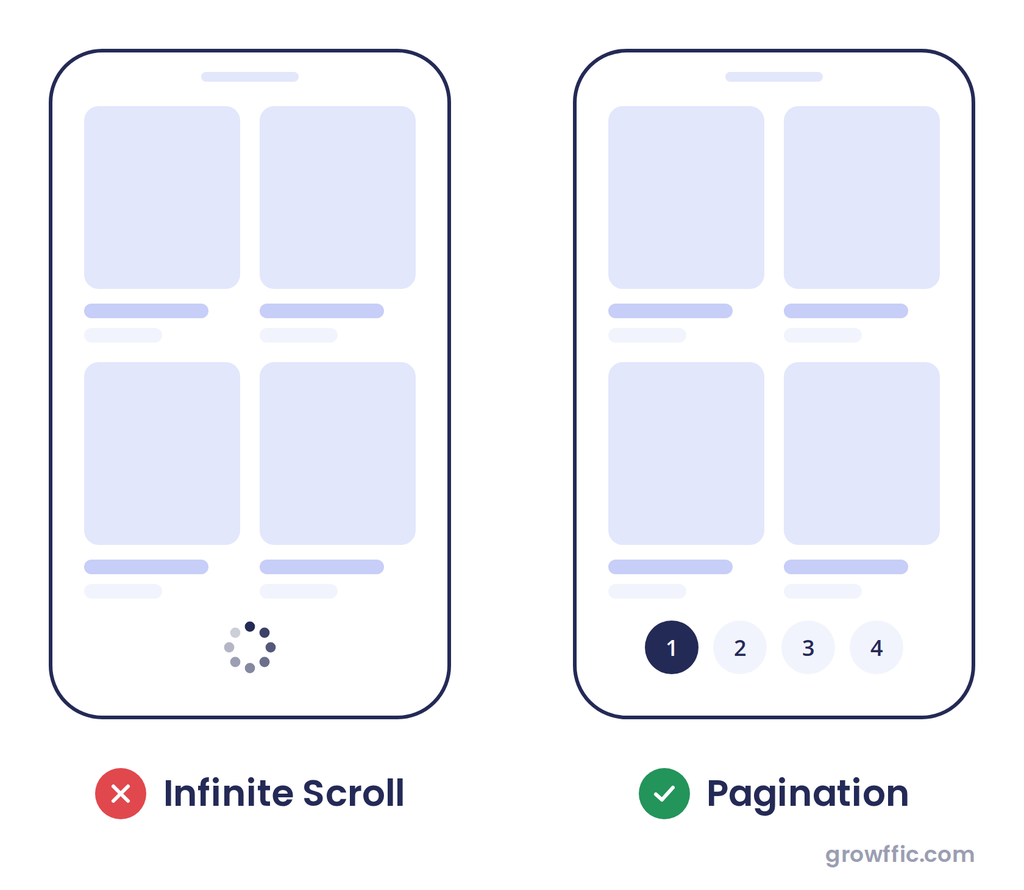
How to fix it: Keep infinite scroll if it provides a good shopping experience, but make sure important products are also accessible through pagination & crawlable links. Where appropriate, use separate URLs for subsequent product batches, such as /category/?page=2.
Learn more about making infinite scroll search-friendly in Google’s guide.
6. Relying on Client-Side Rendering
Google can render JavaScript, but client-side rendering ecommerce pages can run into rendering or resource-loading issues. If important product or category content is missing from the rendered page, Google may not process the content as intended.
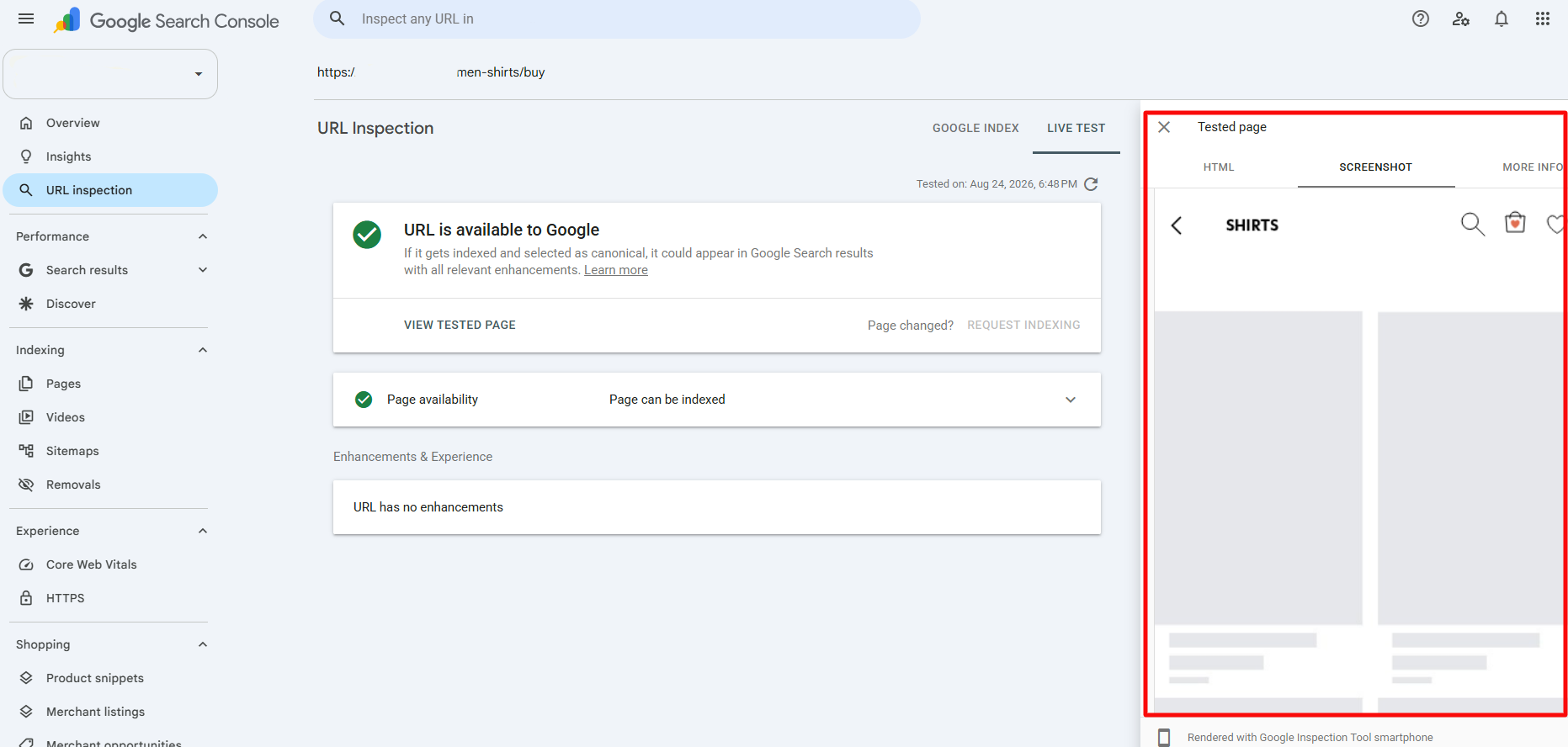
How to fix it: Use server-side rendering or static generation where appropriate for important ecommerce pages. Ensure critical SEO elements, including titles, canonical URLs, product information, and structured data, are available reliably after rendering.
You can use Google Search Console’s URL Inspection tool to compare the page with its rendered version. If important content or SEO elements are missing, review the JavaScript and rendering process to identify the issue.
7. Missing Long-Tail Category Pages
Many ecommerce stores target broad categories such as “running shoes” or “office chairs” but rely on filters to cover more specific searches. The problem is that filter URLs are often not built as dedicated landing pages, with limited unique content, internal linking, or clear indexability signals.
Creating dedicated pages for meaningful long-tail categories allows stores to target more specific commercial searches while giving shoppers a more relevant landing page.
How to fix it: Identify high-intent search variations that have enough products to support a genuine category, then create dedicated, indexable pages rather than relying solely on filters.
Example:
Instead of targeting only: /running-shoes/
Create a dedicated category such as /mens-trail-running-shoes/
When the store has enough relevant products and the category represents a meaningful search demand.
8. Using Duplicate Product Descriptions
It’s common for stores to copy descriptions straight from manufacturers or suppliers, leaving many products with the same content that appears on dozens of other sites.
Unique product content helps your pages provide more useful information than competing with ecommerce sites. This duplicate content adds little unique value and makes it harder for product pages to stand out in search. It also does not help shoppers understand why they should buy from you.
How to fix it: Create unique product descriptions that clearly explain the product’s benefits, key features, use cases, and specifications. Prioritize your most important products first instead of rewriting the entire catalog at once.
9. Using Canonical Tags Incorrectly
When multiple URLs show the same or very similar product or category content, search engines need a clear signal about which version should be treated as the preferred URL.
Incorrect canonical tags can send that signal to the wrong page.
How to fix it: Duplicate pages, such as those created by filters, sorting, or tracking parameters, should not use a self-referencing canonical tag. Point the canonical to the original page instead, and noindex the duplicate version so it doesn’t compete for rankings.
Also check that canonical tags aren’t pointing to broken or 404 URLs, which usually happens when a canonical was hardcoded and never updated after a product page was removed or a URL structure changed.
Example:
You can check this in Google Search Console’s URL Inspection report. In the example below, the website declared one URL as the canonical, but Google selected a slightly different version.
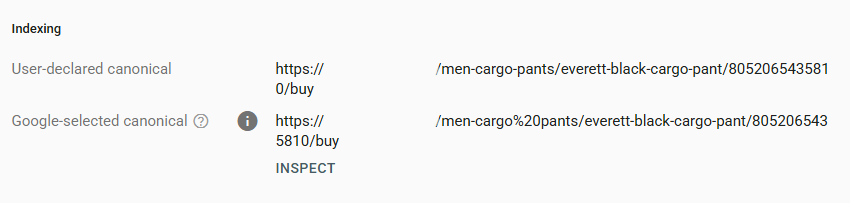
Here, %20 represents a space in the URL. If Google chooses a different canonical than the one you specified, check your canonical tags, internal links, redirects, and XML sitemap to make sure they consistently point to your preferred URL.
10. Ignoring XML Sitemaps and Robots.txt
Many ecommerce stores treat their XML sitemap and robots.txt file as a set-once-and-forget setup, but both commonly break down as the site grows.
One frequent issue is running a static sitemap, a file generated once and never touched again, instead of a dynamic one that regenerates automatically as products are added, removed, or go out of stock. With a static sitemap, it keeps listing products that were deleted months ago, while newly published ones never make it in at all.
A related issue is the sitemap listing URLs that are actually blocked by robots.txt, noindexed, or redirected, which sends Google conflicting signals about which version to trust.
Robots.txt causes a different kind of damage. A single incorrect Disallow rule, often left over from a staging environment or added to block filter and parameter URLs, can end up blocking an entire product or category folder by mistake, or even the CSS and JavaScript files search engines need to render the page correctly.
How to fix it: Use a dynamic sitemap that updates automatically as your catalog changes, not a static file someone has to regenerate by hand. Make sure it includes only canonical, indexable, 200-status URLs, not pages that are blocked, redirected, or noindexed. Review robots.txt after any major site, theme, or plugin change to confirm it isn’t blocking important pages or rendering resources, and cross-check it against the sitemap so the two aren’t contradicting each other.
11. Missing or Invalid Product Schema Markup
Product schema helps Google understand important product details such as price, availability, ratings, and reviews. When this markup is missing or incorrect, Google may not be able to interpret these details accurately or use them in eligible product rich results.
How to fix it: Implement valid product and offer markup schema on product pages, ensuring it matches the information visible to users. Regularly validate the markup and address errors in Google Search Console.
12. Deleting Out-of-Stock and Seasonal Product Pages
It’s tempting to delete a product page the moment an item sells out or a season ends. But that page may already carry organic traffic, rankings, and backlinks. Deleting it wipes out that accumulated search value and leaves shoppers who click old links with a dead end.
How to fix it: Keep temporarily unavailable products live when they’re expected to return, clearly indicate their availability, and offer relevant alternatives.
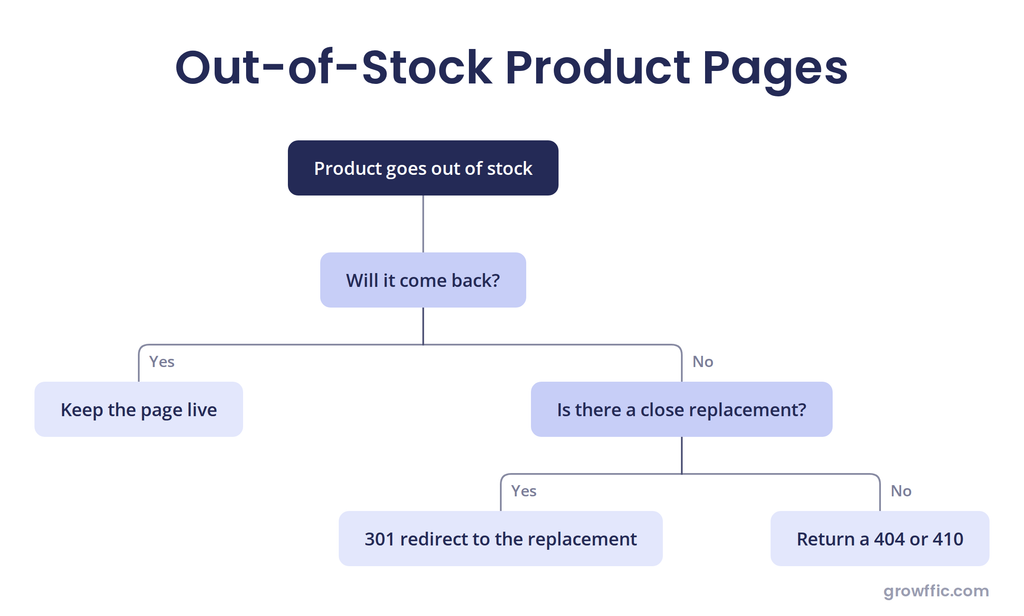
For permanently discontinued products, consider a closely related replacement redirect when one genuinely exists. Otherwise, returning an appropriate 404/410 can be preferable to redirecting users to an unrelated page.
13. Having Slow-Loading Pages on Mobile
Heavy JavaScript, unnecessary third-party apps, review widgets, chat tools, and tracking scripts can slow ecommerce pages, especially on mobile devices. Poor page performance can create a frustrating shopping experience and affect Core Web Vitals.
Deloitte’s “Milliseconds Make Millions” study, which analyzed over 30 million user sessions across 37 major retail sites, found that a 0.1-second improvement in page speed increased conversion rates by 8.4% and average order value by 9.2%, with the effect even more pronounced on mobile.
How to fix it: Remove unnecessary scripts and apps, reduce JavaScript where possible, improve resource delivery, use a CDN where appropriate, and monitor Core Web Vitals on your highest-traffic pages.
14. Using Unoptimized Product Images
Product images need to work for both shoppers and search engines. Large file sizes can slow down page performance, while generic filenames and missing or vague alt text give search engines little context about the image.
How to fix it: Use descriptive filenames and meaningful alt text, compress images without compromising quality, use modern formats such as WebP or AVIF, serve images at an appropriate size, and lazy-load images that are below the fold.
Example:
Before optimization
- Filename: IMG_4821.jpg
- Size: 4,000 × 4,000 px
- Alt text: shoe
- File size: 2.8 MB
After optimization
- Filename: mens-black-running-shoes.webp
- Size: 1,200 × 1,200 px
- Alt text: Men’s black running shoes
- File size: 180 KB
15. Ignoring Google Merchant Center and Free Product Listings
Ecommerce stores can have well-optimized product pages but still lose visibility if their Google Merchant Center data is incomplete or inconsistent. Incorrect prices, missing availability, weak product titles, missing images, or invalid product identifiers can create discrepancies between your website and Google’s product listings.
How to fix it: Keep your product feed aligned with your website, complete all relevant product attributes, resolve feed errors promptly, and regularly review Merchant Center for warnings and disapprovals.
16. Failing to Manage AI-Generated or Programmatic Product Content
Using AI or templates to generate product descriptions and category content at scale can produce repetitive, generic, or inaccurate pages across the catalog when the process isn’t properly reviewed.
AI usage or templates isn’t inherently against Google’s guidelines. The problem arises when content is generated at scale primarily to manipulate search rankings and provides little or no value to users.
At Growffic, we helped one of our clients recover from a Google penalty related to scaled content abuse, restoring their lost organic traffic.
How to fix it: Review AI-generated content for accuracy, add original product-specific insights, and remove repetitive or generic wording. Focus on making each page genuinely useful rather than creating more pages simply to increase the number of indexed URLs.
17. Making Product Pages Difficult for AI Search to Understand
Product content can be difficult for search and AI systems to retrieve when important information is hidden, incomplete, or presented inconsistently.
A common mistake is putting key product details, like specs, materials, sizing, or compatibility, inside tabs, accordions, or “read more” toggles that only load on click.
If that information isn’t present in the page’s actual text content, AI systems extracting answers from the page can miss it entirely, even though a human shopper can see it after one click.
How to fix it: Keep essential product information (specs, dimensions, materials, pricing, availability, shipping) in the page’s visible text, not locked behind interactions or embedded only in images. Learn more about how to rank in LLMs.
Fix These Ecommerce SEO Mistakes With Growffic
Even small SEO issues can affect how easily search engines discover, understand, and rank your product and category pages.
If you don’t check, they quietly reduce traffic and revenue over time. Identifying and fixing these issues can improve organic visibility, drive more qualified traffic, and turn more visits into sales.
Growffic’s ecommerce SEO services help ecommerce businesses uncover hidden SEO issues, optimize high-value pages, and build lasting search performance.
Frequently Asked Questions
Here are quick answers to some common questions about ecommerce SEO mistakes and how they affect your store’s performance.
How can ecommerce SEO mistakes affect sales?
SEO mistakes can reduce organic visibility, prevent important product and category pages from ranking, and make it harder for customers to find the right products. This leads to less traffic and fewer sales opportunities. Fixing high-impact issues improves visibility, traffic, and conversions.
How do I know which ecommerce SEO mistakes to fix first?
Start with issues that prevent search engines from crawling, indexing, or understanding your most important product and category pages. Once those are addressed, prioritize content, on-page, and performance issues based on their potential impact on organic traffic and conversions.
How long does it take to see results after fixing ecommerce SEO mistakes?
Results depend on the type of issue, your website’s size and authority, competition, and how quickly Google recrawls updated pages. SEO generally takes 3 to 24 months, depending on your site’s current stage. Established brands can see results within 3 to 6 months. A new website starting from zero search visibility may need 12 to 24 months of consistent work to achieve meaningful, lasting results.
Can fixing technical SEO issues improve ecommerce rankings?
Yes and no. It depends on the type of technical SEO issue your website has.
For example, if you have mistakenly blocked Googlebot from crawling your website, unblocking it can lead to improvements in your ecommerce rankings. However, if your website has a lot of 404 pages, fixing them doesn’t necessarily improve your keyword rankings.
Can ecommerce SEO mistakes get my store penalized by Google?
Most common ecommerce SEO mistakes don’t automatically trigger a Google penalty, but they can still reduce search visibility or make pages harder to crawl and index, indirectly hurting performance over time.
